

The Task List Widget brings a configurable, filtered task view onto your Homepage dashboards or inside a project, ideal for live WIP and hotsheet-style management without exporting to a spreadsheet.
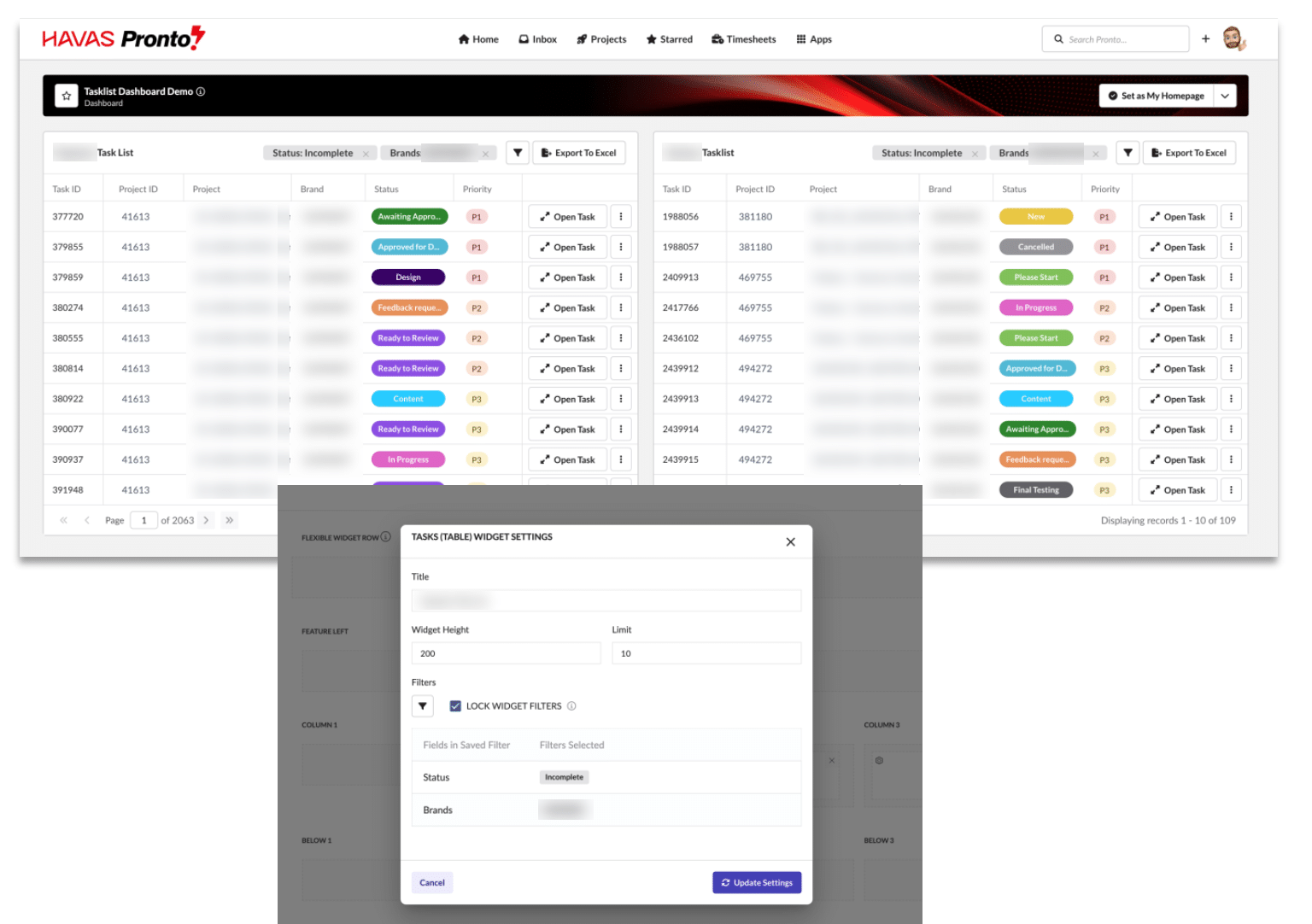
To add and configure a widget
- Open the dashboard (or project) where you want the view and switch to Edit mode.
- Add a Tasks (Table) widget to the layout.
- Click the settings cog on the widget.
- Give it a Title and set the Widget Height and row Limit.
- Choose your Filters (for example Brand, Status, Priority or Project) to define exactly which tasks appear.
- Optionally enable Lock Widget Filters to stop the view being changed by viewers.
- Click Update Settings, then save the dashboard.
Good to know
- You can add multiple widgets to one dashboard, each with different filters, giving tailored operational views for different teams, workflows or reporting needs.
- Widgets update in real time, giving live visibility of active work and delivery risk.