

1. ALL REGIONS
FEATURES
New: AI Timeline Wizard
Meet your new planning superpower: AI Timeline Wizard turns ideas into actionable timelines instantly, so you can move from concept to execution at the speed of thought.
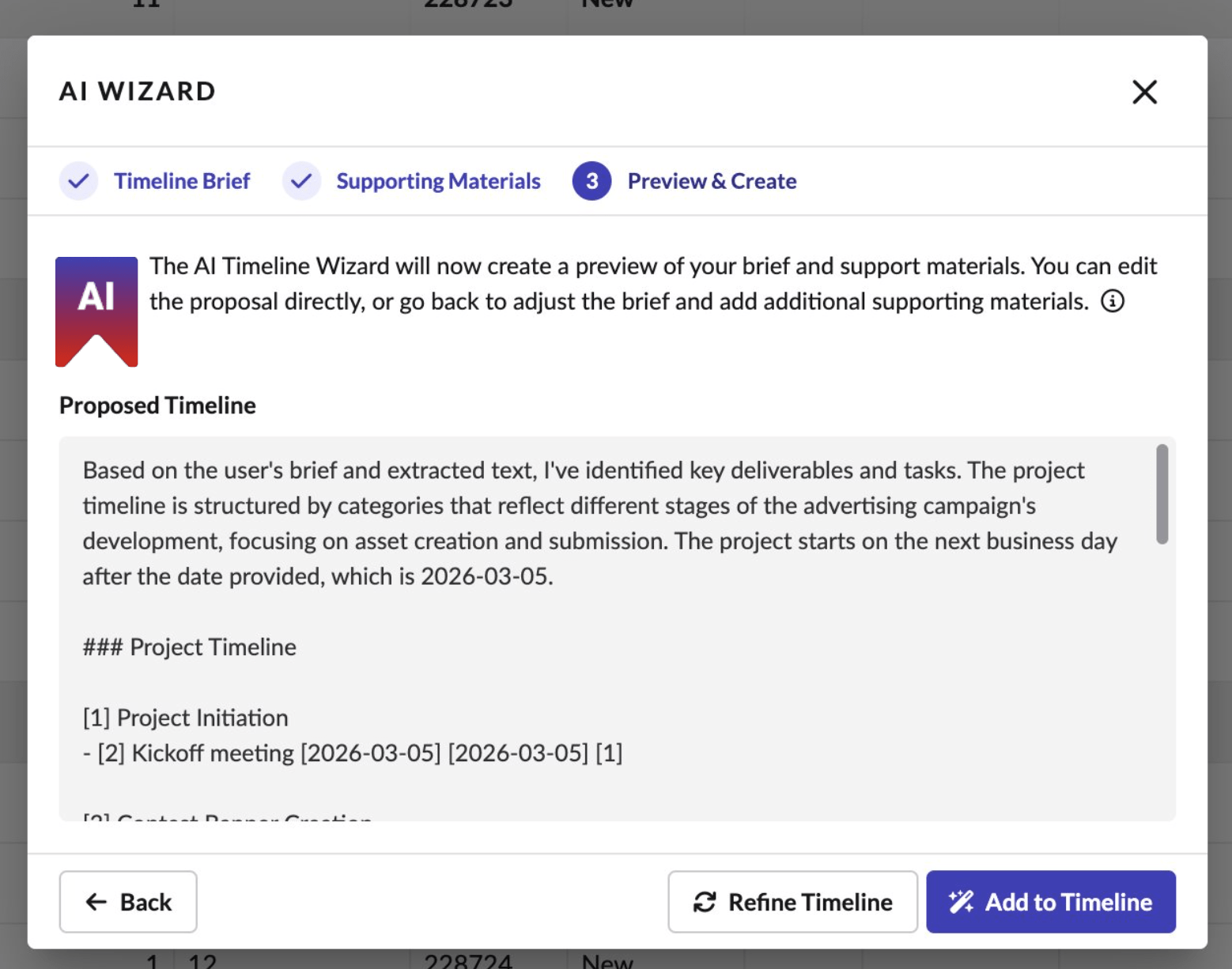
AI Wizard: describe your project
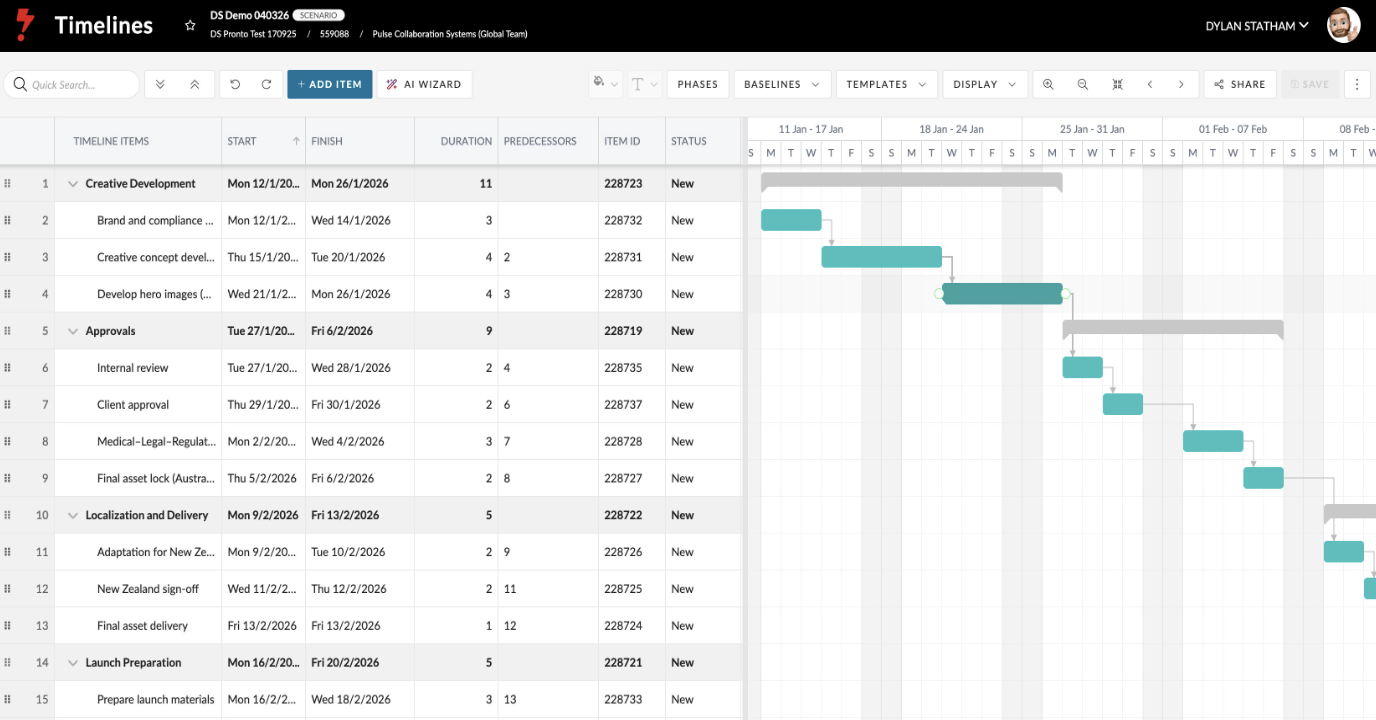
AI-generated timeline with tasks & phases
What it does
• Turn a simple brief into a structured timeline in seconds
• Upload project documents and let AI build a planning starting point from the contents
• Organise phases, tasks, and dependencies into a clean, usable schedule
How to use it
• Open or create any Timeline within a Project and click AI Timeline Wizard
• Describe the timeline you want in plain language, with optional supporting documents
• Review and refine the AI-generated timeline to match your project
Contact your Customer Success representative if you need to enable access to Timelines.
This is just the beginning. AI Timelines is the first release in a broader rollout of AI-powered tools across Pronto, designed to reduce manual effort and speed up planning.
Project Wizard: Major Upgrade
We’ve also re-imagined the Project Wizard so project creation is cleaner, smarter, and more tailored to each Client. The new Project Wizard has already launched in the USA, with rollout beginning in all other regions starting in April.
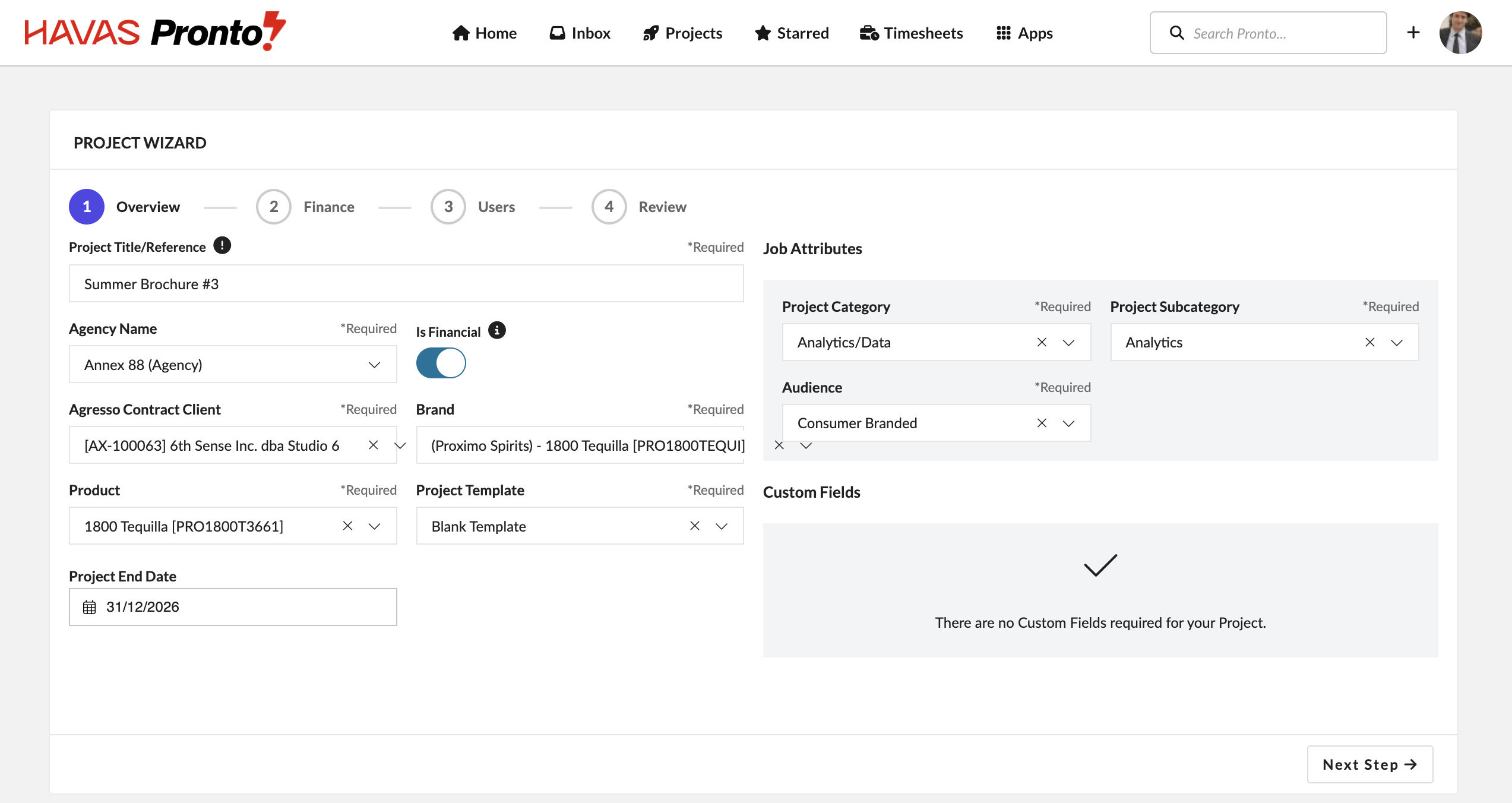
Redesigned Project Wizard with cleaner layout and step-by-step guidance
- Simpler step-by-step flow with fewer distractions
- More tailored defaults, visibility rules, and setup behaviour by client
- Cleaner handling of custom fields, user groups, and project tasks during setup
New: Faster File Uploads in the Files Tab
We’ve redesigned the File Upload form inside the Files Tab to make uploading assets simpler and faster, with clearer folder selection and a cleaner path from choosing files to upload.
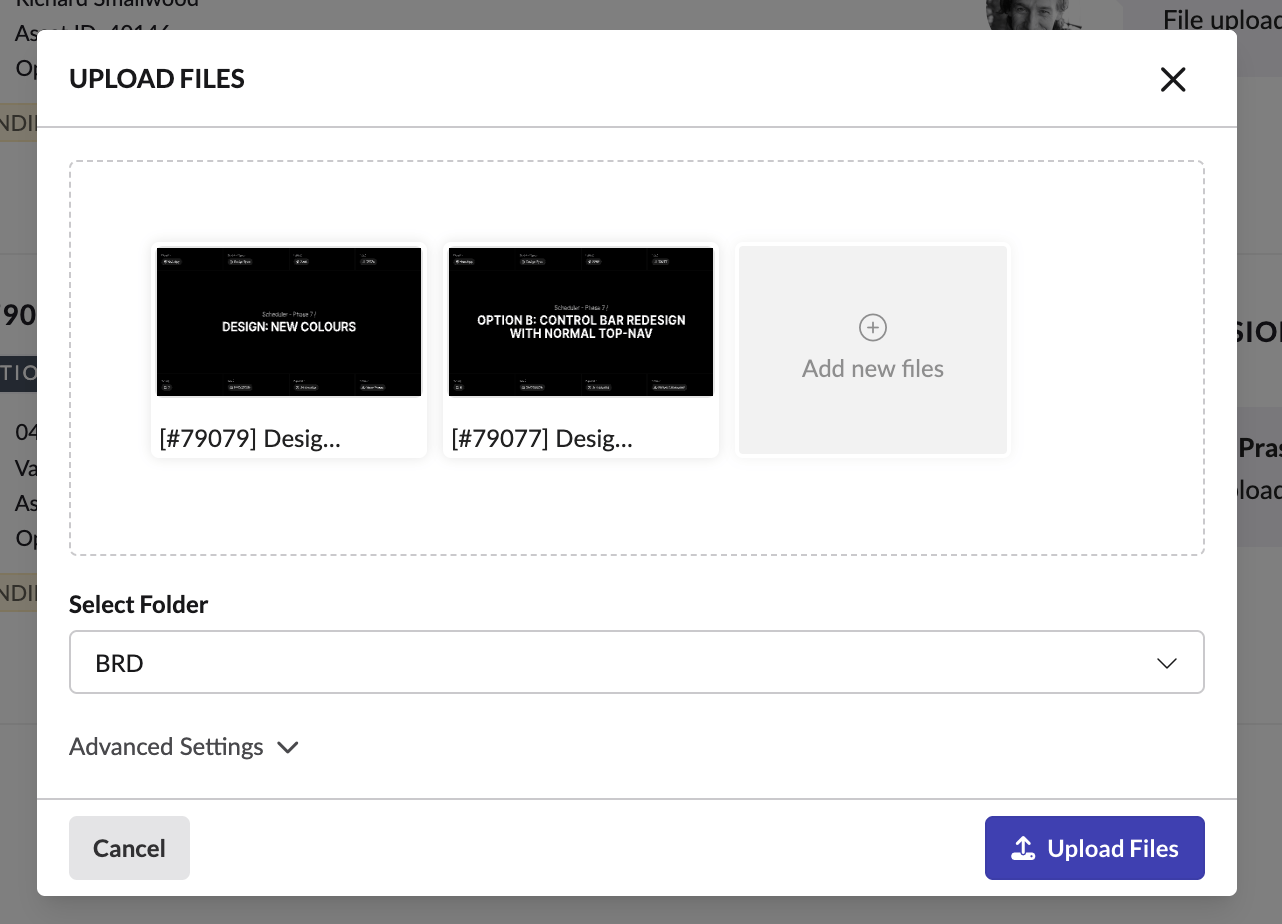
Simplified upload flow in the Files Tab with clearer folder selection and a cleaner layout
This update streamlines one of the most common actions in Pronto: getting files into a project quickly and cleanly.
It’s also an early step in a broader Files Tab redesign and upgrade planned for later this year.
- Cleaner, simpler upload experience with less clutter
- Improved folder selection and hierarchy handling
- Faster upload times
Other highlights this month
A lot more landed in April too – enough to make the platform feel noticeably smoother, more reliable, and easier to work with.
- Copy Estimate improvements – wider columns, clearer pricing details, and better filter coverage make it easier to find and compare the right estimate
- Email template upgrades – key timesheet emails now use the new Pronto template, with cleaner branding and clearer rejected-timesheet messaging
- Excel export improvements – report exports now use proper XLSX formatting for more reliable spreadsheets, cleaner data, and fewer localisation issues
- Finance reporting upgrades – fixes to credit line handling, amount formatting, and search stability make finance reports more dependable
- Timesheet workflow updates – improvements to negative time handling, blocked date validation, and weekly carry-over reduce friction in day-to-day time entry
- Public link improvements – video previews, loading states, and download handling have been refined for a smoother file-sharing experience
Enhancements
[#75281] Timesheet Compliance: Update the Reminder Email
The Timesheet Reminder Email has been migrated to the new Pronto email template. The header now displays the Pronto logo, and the footer has been updated to reflect Pronto’s link structure. Trigger logic, recipient rules, send schedule, and email subject remain unchanged.
[#75284] Timesheet: Unsubmitted Time
The Unsubmitted Time Email has been migrated to the new Pronto email template. The header now displays the Pronto logo, and the footer has been updated to reflect Pronto’s link structure. Trigger logic, recipient rules, send schedule, and email subject remain unchanged.
[#75298] Timesheets: Timesheets Rejected
The Timesheet Rejected Email has been migrated to the new Pronto email template. The header now displays the Pronto logo, and the footer has been updated to reflect Pronto’s link structure. Trigger logic, recipient rules, send schedule, and email subject remain unchanged.
Additionally, the rejection comment provided by the approver is now prominently displayed in a highlighted callout block near the top of the email body, with increased font size and weight to ensure recipients immediately see the reason for rejection. Where no rejection comment exists, the callout block is omitted and the email renders normally. Trigger logic, recipients, and timesheet rejection functionality are unchanged.
[#75271] Timesheet: Timesheet Email for Time Approvers
The Timesheet Email for Time Approvers has been migrated to the new Pronto email template. This update modernises the email’s visual design and sender identity to align with the Pronto platform, with no changes to the underlying trigger logic or recipient rules.
[#75282] Timesheet Compliance: Update the Lockout Email
The Timesheet Lockout Email has been migrated to the new Pronto email template. The header now displays the Pronto logo, and the footer has been updated to reflect Pronto’s link structure. Trigger logic, recipient rules, send schedule, and email subject remain unchanged.
[#78357] Reports: Exports into Excel with the proper formatting
Report exports have been standardised to XLSX format to resolve longstanding issues with CSV exports, where system localisation settings frequently caused columns to collapse into a single cell, numbers and dates to render as plain text, special characters to corrupt data, and newline characters in fields like comments to break the file structure entirely.
[#77655] 3. FE: Update Branch API in Project Wizard & Finance Profile
The Branch dropdown has been updated across the Project Wizard, Finance Profile, and Agreements to filter results by the new project_profit_centre field, ensuring only branches marked as project_profit_centre = ‘Y’ are available for selection. This applies to the old and new Project Wizards, the Financialise flow, and both Project Wizard and Resource Sharing agreement types in Agreements.
[#79534] Remove the “create new folder” using the new Upload Form
Removed the “Create” option from the folder search dropdown in the new Upload Form. The option was non-functional — attempting to create a new folder would silently fail and upload files to the default “Asset” folder instead. Searching for a folder name that doesn’t exist now correctly displays “No results found”.
[#79599] Enhancement: Remove the ability to edit the file name in the new Upload Form
Removed the ability to edit file names within the new Upload Form, as the functionality was buggy. File names are now read-only during upload.
[#75401] Regression: Task Status Options Not Alphabetically Sorted in Filters and Bulk Edit Modal
Resolved an issue where Task Status options were no longer displayed in alphabetical order across filters and the Bulk Edit modal. Status lists are now consistently sorted A–Z, with “Any Status”, “Open”, and “Incomplete” pinned to the top in that order. No impact to filtering or bulk edit functionality.
[#78100] FE: Allow Void Submitted to be copied
The “Copy Estimate” modal has been updated to include void and submitted estimates in the preset filters for “Matching Ratecard”, “All Estimates”, and “Estimates Created by Me”. Previously these filters did not account for void or submitted statuses, meaning some estimates were missing from the list. Deleted estimates continue to be excluded across all preset filters.
[#79183] FE: Set column width for some columns in Copy Estimate modal
Adjusted column widths in the Copy Estimate modal to improve readability without requiring manual resizing. Reference and Job Title columns are wider to accommodate longer text, Estimate Number, Job No., Status, and Currency are sized to fit their content without excess space, and Master Client, Brand, and Product columns have been widened slightly. Price List and Currency columns have also been added to the modal.
[#79777] Enable Brand Approval and Mag Approval Groups to include “HIDDEN” groups
Brand and Magnitude Approval Group dropdowns in the Brand Approval page now include hidden groups in their search results. Hidden groups were previously excluded following an earlier change, but this prevented superusers from assigning them during the brand approval process. Hidden groups remain invisible to project managers elsewhere in the platform.
FIXES
[#79484] BE: Set TBD as job number for not approved jobs
The new Project Wizard now respects the network-level “Auto Generate Job ID” setting for unapproved and non-financial projects. When enabled, the Job Number is set to the Pronto Job ID; when disabled, it is set to TBD. This restores parity with the V1 behaviour, addressing confusion among clients who could not distinguish between approved and pending projects when TBD was replaced by an auto-generated ID.
[#79653] BE: Allow negative timesheets when enabled for the Users Office
Fixed a bug where negative timesheet entries were being blocked from saving even when the office configuration permitted them. The backend validation was incorrectly rejecting any hours below zero regardless of the office setting. The validation now correctly checks whether the timesheet user’s office has “Allow negative time on timesheets” enabled, allowing negative entries where permitted and returning a clear validation error where not.
[#79733] Tax Code not set during Master Job Process
Fixed a bug where selecting a Contract Client in the Master Job Builder was not pulling through the client’s default Tax Code, despite all other client defaults populating correctly. The Tax Code field is now correctly inherited from the Contract Client’s defaults on Master Job creation.
[#79565] Time submitting against blocked/ expired end date
Fixed a bug where time entries added directly to a task on a project outside its valid timesheet date range were being saved despite a warning message indicating the project was invalid. The warning was displayed correctly but did not prevent the time from being written to the timesheet. Time entries on invalid projects are now correctly blocked from saving.
[#79500] Bug: financial report shows invoice credit amount 2 times.
Fixed a bug in the Finance Summary Report where credit lines were appearing twice, causing incorrect totals. Despite each credit note existing only once in the database, a query join issue resulted in duplicate rows being returned in both the report view and the export. Credit lines now display correctly as a single entry.
[#77969] Projects on Timesheets do not get carried over to next week
Fixed an issue where some active projects with time logged in the current week were not being carried over to the following week’s timesheet. Affected projects were active and within valid date ranges but were inconsistently excluded from the pre-loaded project list on the next week’s view.
[#79796] Bug: Format Amount (ex-tax) as a currency column in the Finance Reports
Fixed the Amount (ex-tax) column formatting in the Finance Detail and Summary Reports. The column now displays with a currency symbol and two decimal places in the UI (e.g. GBP 100.00), while the underlying API response and Excel export retain a plain numeric value with two decimal places (e.g. 100.00) — ensuring the export remains fully summable in Excel and API consumers are unaffected. This restores a previously reverted fix that had broken the export.
[#79222] Fix Public Link Landing Page issues for Video Files
Three improvements have been made to the Public Link landing page for video files. The header bar now correctly fills the full width and height of its container. Video preview thumbnails are capped at 10 and evenly distributed across the video duration, replacing the previous behaviour that generated a thumbnail every 3 seconds. Additionally, opening a Public Link before the video has finished processing now displays a clear loading state with a spinner and supporting message, rather than appearing broken or blank.
[#79541] New Upload Form: “Select Folder” dropdown doesn’t display nested folders
Fixed an issue in the new Upload Form where the “Select Folder” dropdown did not reflect the folder hierarchy shown in the Files tab. Nested folders were incorrectly displayed at the bottom of the list rather than indented beneath their parent. The dropdown now mirrors the folder structure as it appears in the Files tab.
[#78864] Bug: Date From for Void
Fixed a bug where voiding an Estimate would set the Valid From date on the newly created void Estimate to today’s date rather than inheriting it from the original. This produced invalid date ranges and caused submissions to Agresso to fail with a “Period not in timeFrame” error. The Valid From date now correctly mirrors the original Estimate’s Valid From date, and both Valid From and Valid To dates are validated against the parent Project’s dates and adjusted if necessary.
[#79431] Bug: Project Amendments > Remove the ‘status’ filter from the Currency dropdown
Fixed an issue in the Project Amendments modal where the Billing Currency dropdown was incorrectly filtering currencies by active status for Agresso offices. For Agresso offices, available currencies are determined by Agresso Rate Cards rather than the status flag, meaning valid currencies such as BGN, DKK, NOK, and RON were being excluded from the dropdown.
[#79631] FE: Bug: Brand Approval > Amend: Link to new Request
Fixed an issue where the automated reviewer comment on Brand Approval requests (type 4) was rendering the new request link as a raw HTML tag rather than a readable hyperlink. The comment now displays the link to the new request correctly formatted.