

1. ALL REGIONS
FEATURES
[1739] Copy Estimate
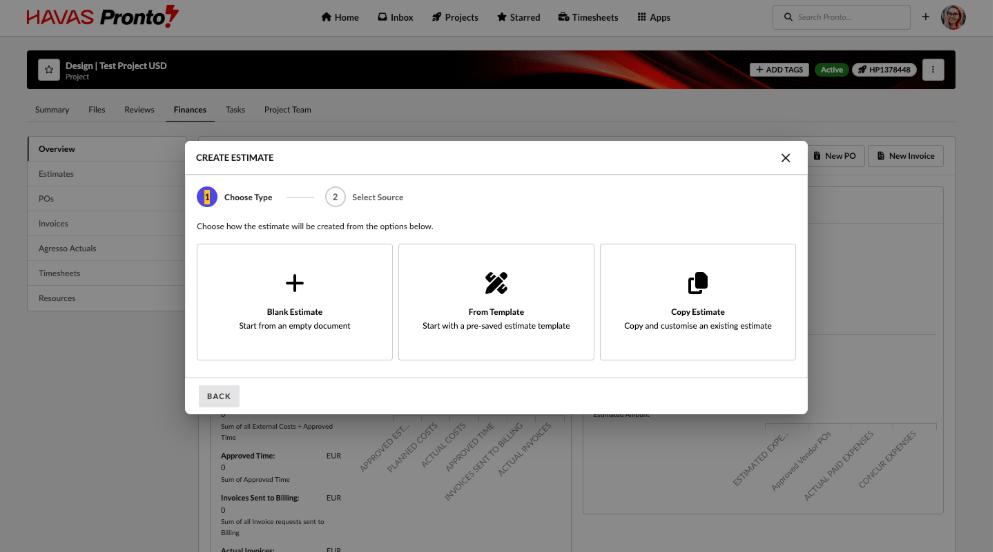
We’ve improved the way estimates are created to make the process faster, clearer, and more consistent.
What this means for you
You can create estimates more quickly
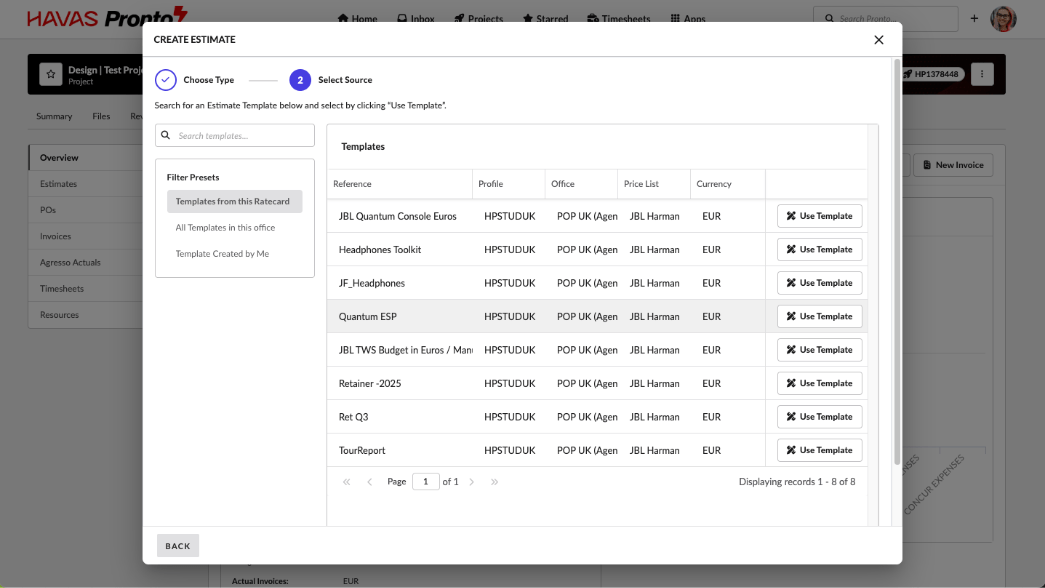
You now have the option to start from a blank estimate, use an existing template (where available), or copy a previous estimate instead of rebuilding one from scratch.
Less rework when creating similar estimates
Copying an estimate carries over the key information you need—such as activities and quantities—while automatically resetting things like references and contacts so each estimate stays unique.
- Easier to find the estimate you want to copy
When copying an estimate, you can search and filter to quickly locate the right one. Old (older than 18 months) or deleted estimates are hidden, so results are cleaner and easier to navigate.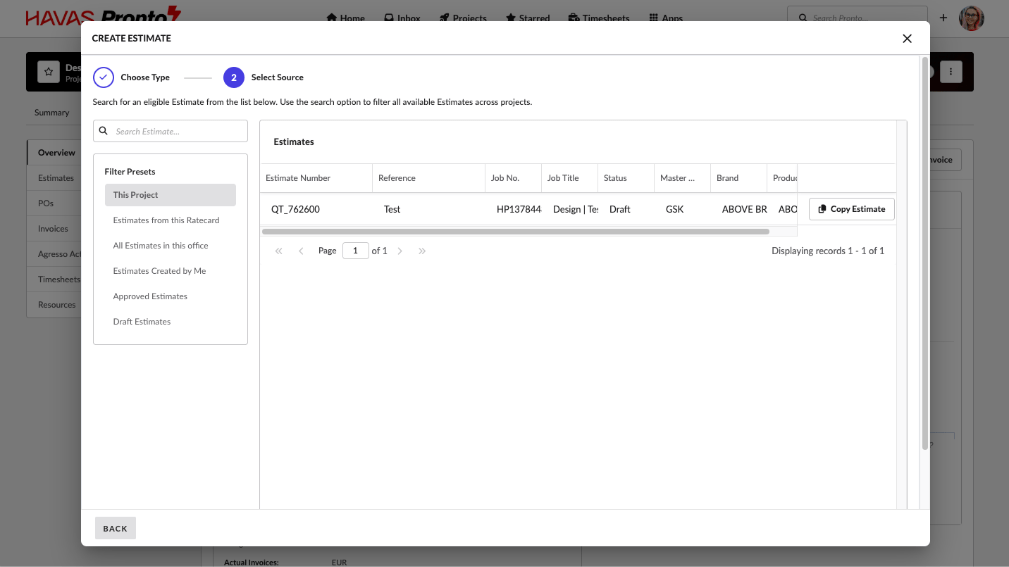
- Fewer errors and clearer results
New estimates automatically use valid dates and the correct setup for your office, reducing the chance of missing or incorrect information.
- A more consistent experience across offices
Whether you’re in an Agresso or non-Agresso office, estimate creation now behaves in a more predictable and reliable way based on how your office works.
Overall, this upgrade reduces manual effort, avoids common mistakes, and makes creating estimates quicker and easier.
Enhancements
[#76957] Finance Report Display Currency should respect the default office currency
Finance reports are displaying charts at the top of the report page in the default currency of the logged-in user.
[#77199] Add V1 Estimate report back in to the Reports Landing Page
Reintroduced the legacy Estimate Report to the Reports landing page under the Finance section. This restores customer access to the existing Unbilled Estimates report while a v2 replacement is pending, with permissions and behaviour matching the previous implementation.
[#78748] FE: Add Project filter in the Retainer Report
We have added a new project filter in the Retainer Report. One, or several projects can be filtered based on their job number or name.
[#75565] BE: Update sort by status name in alphabetical order
Fixed a regression issue where Task Status options were no longer displayed in alphabetical order. Status lists are now consistently sorted A–Z across task filters and the Bulk Edit modal, with no impact on filtering or bulk update behaviour.
FIXES
[#78381] Missing time report showing users as missing before finance profile start date
We fixed an issue affecting some users where the Missing Time Report could show missing time before a finance profile’s start date, even after that start date had been updated.
Previously, when a finance profile start date was changed, the Missing Time Report didn’t always refresh its calculations, which could leave people incorrectly flagged as missing time for dates that should no longer apply.
[#78709] Group By CSS fixes
We have visually cleaned up the list of users and grouping in Resource Scheduler.
[#78793] Bug: Booking History table has wrong column width
We have fixed column formatting issue in the History tab which is in the Booking form in the Resource Scheduler.
[#79172] Bug: Filters in Finance Report does not work
We fixed an issue in the Finance Summary Report where filtering by Estimate To, PO To, or Invoice To would incorrectly return zero results, even when matching records were clearly visible in the report.
Previously, selecting a value in these “To” filters would cause the report to show no data, making the filters unusable.
[#78316] Timelines: Duration was calculated incorrectly by setting a constraint MFO for a two day item that spans a weekend (RC Testing)
Fixed an issue where applying a Must Finish On constraint to a Timeline item spanning a weekend could incorrectly shift the start date and result in an off-by-one duration error. Timeline start date, end date, and duration now remain consistent and accurate.
[#78343] Bug: Inbox > ‘View all projects’ doesn’t link to Project list
We fixed an issue in the Inbox where clicking “View All Projects” did not take users to the full project list.
Previously, the link could incorrectly show starred items instead of opening the Project List, which was confusing and made it harder to find projects.
[#78349] Finance Reports: Issues with specific filters
We fixed an issue in the Finance Summary Report V2 and Finance Detail Report V2 where typing to search within certain filter dropdowns didn’t behave correctly.
Previously:
- Searching in Project/Job Status, Estimate Status, and Invoice Status could return no results, even when the option clearly existed.
- Searching in Item Group didn’t narrow the list down, and would continue showing all options even after typing an exact match.
What’s fixed now:
- The “type to search” feature now correctly filters results in these dropdowns:
- Project/Job Status
- Estimate Status
- Invoice Status
- Item Group
- Dropdown lists now narrow down as you type and show matching options as expected.
This makes filtering finance reports faster and avoids confusion when selecting statuses or item groups.
[#78404] Bug: Minimum password requirements fail to create, or update account
We fixed an issue in Address Book → Users where users could appear to save a new account (or update an existing one) even though the save was actually rejected due to a weak password.
Previously, if a password didn’t meet the required security rules:
- The system could still look like it saved successfully.
- User changes wouldn’t be saved, but this wasn’t clearly explained.
- The only clue was a hidden-style message like password: security_fail, despite the action looking “OK”.
What’s fixed now:
- Password requirements are now shown clearly above the password field (both when creating a user and when resetting a password).
- The form now checks the password strength before saving and immediately warns you if it doesn’t meet the minimum rules.
- If the password is rejected, the system now shows a clear error message and makes it obvious that the save did not go through.
This prevents confusion, avoids “silent failures,” and makes it easier to create or update users successfully the first time.
[#78768] Timesheets: ‘Why can’t I see my project?’ fails with 500 error
We fixed an issue in Timesheets where the “Why can’t I see my project?” help tool could fail when you entered a project number.
Previously, entering a project number in the modal could trigger an error and the page would show a generic “Error” message instead of explaining the issue. This meant users couldn’t use the tool to understand why a project wasn’t available for time entry.
[#77955] Havas Istanbul: MISSING Activity issues
We fixed an issue affecting non-financial projects that use the System Ratecard.
Previously, when creating finance documents (Estimates, POs, Invoices) on these projects, the activity list could be pulled from the wrong network (based on the user’s setup rather than the project’s network).
This could cause:
- Missing or incorrect activity options when creating documents
- Older finance documents appearing as “missing” because the expected activities weren’t available
What’s fixed now:
- If a project uses the System Ratecard, activity options are now correctly taken from the project’s network, not the user’s primary office.
- If a project has a specific ratecard selected, the activity options continue to come from that ratecard as expected.
This ensures finance documents always show the right activities for the project and avoids “missing” items caused by incorrect activity mappings.
[#77841] Fix: Orphaned Tasks after Finance Documents are voided
We fixed an issue where workflow tasks could re-open and remain active after a related finance document (Estimate, PO, or Invoice) was voided.
Previously, voiding a finance document removed the document PDF, but the associated workflow task could stay behind (or even re-open), leaving an orphaned task in the task list with nothing meaningful to action.
What’s fixed now:
- When an Estimate, PO, or Invoice is voided, any related workflow task is now automatically updated to “Deleted”.
- This prevents voided documents from leaving behind open or misleading tasks.
- Task lists will now better reflect what actually needs attention, reducing noise and confusion for users
[#78007] FE: Finance Profile error with Handshake Agreements
We’ve fixed an issue that could allow invalid agreements to be created when setting up Global Worker arrangements.
Previously, depending on the order in which offices were selected, it was possible to create an agreement where the Lending and Borrowing offices belonged to the same finance profile. These agreements should not be allowed and, in some cases, caused timesheets linked to them to fail.
What’s fixed now:
- The system now consistently checks that Lending and Borrowing offices belong to different finance profiles, regardless of selection order.
- If the Lending (Source) Office is changed, the Borrowing Office selection is automatically cleared to prevent invalid combinations.
- Invalid agreements can no longer be saved.
This ensures agreements are always set up correctly and prevents timesheet failures caused by incorrect office combinations.
[#78529] Fix: Talentspace PTO – old website link
We’ve updated the Request PTO link for offices using TalentSpace PTO to ensure it directs users to the correct, up-to-date guidance.
Previously, when TalentSpace PTO was enabled, clicking Timesheets → Request PTO opened an outdated Pulse website. This could cause confusion and send users to the wrong documentation.
[#78534] Portal Manager: URL issue when clicking to edit portal pages, which redirects user to 404 page
We’ve fixed an issue in the Portal Manager that prevented users from editing portal pages.
Previously, when clicking the edit (pencil) icon on a portal page, the system generated an incorrect URL. This caused the page to redirect to a 404 error, making it impossible to open the page for editing.
[#78773] FE: Missing Time Report breaks on User Date To
We fixed an issue in the Missing Time Report where the page could break when displaying the User Date To column.
Previously, the report could return an invalid “end date” value for some records. When this appeared in the results, the report couldn’t display the date properly and the page could fail to load correctly.
[#78685] Timesheet approvals screen now loads reliably for large, heavily filtered views
We fixed an issue that could cause the Timesheet User Data view to fail to load for some users (most commonly network admins) when using multiple filters at once.
Previously, certain combinations of permissions and filters created an overly complex request behind the scenes. This could hit a system limit and result in an error (including occasional 500 errors), preventing the page from loading.
What’s fixed now:
- The system now builds these filtered results in a more efficient way, avoiding the “too complex” request limit.
- Network admins and other high-permission users can use multiple filters without the page failing.
- Results returned remain the same as before—this change is focused on reliability and performance.
User impact:
- Fewer load failures when reviewing or approving timesheets with advanced filtering
- Faster or more consistent loading in many cases, especially for high-volume users
3. TECH DEBT
[#76775] Reduced unnecessary error alerts for suspended users
We’ve improved how the system handles activity from suspended user accounts to reduce unnecessary error notifications.
Previously, when a suspended user attempted to access or submit a timesheet, the system correctly blocked the action but also logged this as an error in our monitoring system. This created noise in error reporting, even though the behaviour was expected and not an actual system issue.
What’s fixed now:
- Attempts by suspended users are still blocked as expected.
- The event is now logged internally as a warning for reference.
- These events are no longer sent to the error monitoring inbox, reducing false alarms and keeping error reports focused on genuine issues.
This change improves system monitoring and avoids unnecessary alerts for expected account-related behaviour.
[#78766] Improved reliability when uploading large task attachments
We fixed a recurring issue that could cause slowdowns and occasional failures when updating tasks—especially when adding comments and uploading larger files.
Previously, each small change to a task could trigger a heavy background update, which sometimes led to timeouts and repeated error alerts in monitoring. In some cases, this could impact the user experience during uploads.
[#79003] Asset downloads now work for filenames with special characters
We fixed an issue where some files couldn’t be downloaded or opened after migration if their filename contained special characters — especially “+” (and sometimes spaces).
Previously, these files could fail with an error when you tried to open or download them via a public or shared link, even though the file existed. This mainly affected migrated assets stored in S3.